Showing posts with label blogging. Show all posts

12/16/16

Should You Care About Readability Tests?

Do you use WordPress for blogging?  Then you may recognize the “Flesch-Kincaid Readability Score” in its critique of your content.   

The platform gives both a percentage and a critique.  Sometimes, it may find  your content is “hard to read.”   There may be suggestions, too: things like too much use of passive voice, for instance. 


Word Press Readability Critique

So, does your post content need more work?  Maybe yes; maybe, no. 

The WordPress critique also gives two thumbs up if your post is a mere 300 words long.  For many blogs (especially those focusing on legal topics) 300 words is not enough to get the job done. 

So my first point is to take the WordPress editor with a big fat grain of salt.  It’s not all one size fits all out there. 

The goal is to do what’s right for your reader.   Be smart.  Be savvy. 
.

How Readability Tests Work

This is not to say that I don’t like the idea of a readability test.  After all, its purpose is to help you connect with your readers by insuring your writing corresponds to their reading level.   

How?  Like a magician, the readability test throws several things into its top hat before pulling out its white rabbit: things like how often you use passive voice, the complexity of your sentences, the length of your paragraphs, and if you use adverbs. 

Cut and paste your content into their tool (which automatically happens in WordPress), and voila! You have a readability score. 

The Writer discusses readability tests and reports that 65 is a good score on Flesch-Kincaid for “business writing.”  And it points out that the Flesch-Kincaid Readability Test is one tool; there are others, as well. 

In fact, RavenTools has compiled a list on its blog described as the “ultimate list of online content readability tests.”  If you’re curious, then go check out their collection. 
.

It’s All about Your Reader

Here’s my second point.  It’s not about the readability score as much as it is about the writer understanding his or her reader. 

If you are writing a legal blog discussing new SCOTUS opinions, where your readers are fellow lawyers and legal scholars, then your writing will score differently than if you are writing a blog explaining a new SCOTUS opinion to the general public.   (Wow, look at that long sentence!)

You aren’t writing for yourself.  You’re writing to convey a message.  If a readability test helps you to visualize and understand your reader better, then that is the best reason to use it.  IMHO.
.

Have Some Fun with It

Oh, and one last thing.  Have some fun with these readability tests. Go grab some of your favorite writing and plug it into the thing. 

Say, throw some David Foster Wallace into your WordPress blog platform.  What pops up in the critique?  

Or try Ernest Hemingway, Nora Ephron, Truman Capote, or James Baldwin.   See how they score (and think about their intended readers).   


1/2/14

Cool Public Domain Images: Free Photographs of Golden Age Movie Stars on Wikimedia Commons (Publicity Stills)

Images are becoming more and more important for websites and blogs, given the growing popularity of Pinterest and Google+, among other social media sites.  Finding quality photographs to accompany your words isn't hard to do on the web; however, tracking down great images in the public domain is not as easy.

You want public domain images because they are free to use.  Images (photos, infographics, clip art, etc.) are protected by copyright laws and they are not free for your use in your blog post or on your web page unless the creator has released their copyright, or the copyright protections do not apply for some reason.

For instance, federal government images are not protected by copyright and you are free to use images found at sites like NASA and the CDC.  

Publicity Stills: Another Source of Public Domain Images

Another great find for public domain images:  publicity stills that are in the public domain.  Like Fred Astaire dancing in promotion of the film "Daddy Long Legs" above, of the image below of Elvis Presley promoting "Jailhouse Rock."

Granted, both of these images are of stars dancing but maybe I'm in a dancing mood this morning - it's the first working day of 2014 and I'm excited about this year!  However, you can find lots of other great photographs to choose from by going to Wikimedia Commons and searching for "film stills"  or "publicity photos."  Lots to choose from - with famous faces and people doing things other than dancing.

These Hollywood Golden Era movie stills are free from copyright protection and in the public domain because they were published in the United States between 1923 and 1963 and any copyright was not renewed.  However, publicity stills by definition are generated for publicity and many, like news releases, are disseminated for widespread use with a release of copyright in order to promote an actor or a movie or a TV show.

You need to check before using newer images, however.  For details on more recent imagery, visit CreativeClearance.  Newer film stills may retain their copyright and you'll need to pay for their use in your publication (and a blog is an online publication).

From Wikimedia Commons:
As explained by Additional source information: This is a publicity photo taken to promote a film actor. As stated by film production expert Eve Light Honathaner in The Complete Film Production Handbook, (Focal Press, 2001 p. 211.):  "Publicity photos (star headshots) have traditionally not been copyrighted. Since they are disseminated to the public, they are generally considered public domain, and therefore clearance by the studio that produced them is not necessary."

12/9/13

Web Writing Tip: Never Write Directly in Your Blog Platform Because You May Lose Your Blog Post - and What to Do if This Happens

Sure, it’s faster and pretty darn easy to write your blog post directly into your platform, whether it’s WordPress or Blogger. It’s faster to get the post done and published and out on the web — and it’s so much easier to insert hyperlinks this way.

I get it. I wrote directly into the little box on the screen for Blogger or WordPress for several years.

Until I was happily writing away, inserted a link or two, and hit the publish button only to have the platform crash. Crash, as in lost.


Everything was gone. The content, the links, the image.

Irritating, obviously. So I heaved a heavy sigh, and rewrote the darn thing. (Google History helped here.) It wasn’t as much fun this time, I didn’t write with as much zip, but the re-creation was not that difficult.

I made sure I saved the stuff a couple of times, to be on the safe side. No worries. I hit publish.

Everything disappeared from the screen. I saw the dreaded “404” error message.

So, I made a phone call to the designer ….

And learned this lesson that I would like to share with you.

Never, and I mean NEVER, write directly into the blogging platform.

Write your blog post in Word, Google Docs, or Scrivener; collect your hyperlinks; get your image ready to go, and then open WordPress or Blogger.

Here are some things I do to make this smoother since, yes, it’s not as fast and speedy to create your post in one place and then transfer it into the platform as it is to do everything in one spot.

1. I write everything into a content draft so I can “select all” and easily drop everything into the blogging platform. I use Scrivener for this, although many of my clients use Word to write their stuff. This is an easier thing to accomplish with WordPress than Blogger for Scrivener pastes — in Blogger, I have to take the time to insert paragraph breaks, etc., and I have to make sure that I’m inserting into “html” and not the “compose” block or things are even more hopper-jawed. It’s a pain, but not enough to make me stop using Scrivener.

2. Links are important in blog posts. I insert hyperlinks into my content as I go because I’ve found that it’s easier to remember what phrase you want to use with the link when the hyperlink is closer to the chosen text than if all your links are listed in a group at the end of your document (or bookmarked or tagged in Pocket, etc.). My practice is to insert the hyperlink immediately below the paragraph I’ve written, and if there are two links, then I insert them in the order they’ll appear in the content.

3. It also helps me to write the title and place it into the top of the content. Not as the title of the Word document or the Scrivener file, but as the first sentence of the post’s content.

4. As soon as I cut (or copy) from Scrivener and paste my entire block of content into the platform, I save it. No categories, no tags, I just save the inserted content immediately.

5. AFTER I save the post in the platform, I take the title I’ve written from the top of the content block and insert it into the title bar. Why? WordPress has given me problems a time or two with crashing when things are placed into the title bar. This way, if there’s a crash, hopefully that content is safely saved. I save again now.

6. Then I edit the post title’s file name (for example, see that little spot in WordPress right below where the title appears) because the platform will save something without a good description like “834” - and unless you change it, that’s what will appear in the hyperlink for your blog post.

12/1/13

How Does Your Blog Look on a Tablet or Smartphone? Look Here (and Here's Why It's Important).

Traditional blog platforms (think WordPress, Blogger) were designed for desktops and laptops -- not for smartphones and tablets.  Which means that your blog may look strange and hard to read on your IPhone or IPad (or other phone or tablet device) unless you've taken steps to accommodate these new smaller-screen devices.

How can you find out how your blog appears to readers using a smartphone or tablet?  

The easiest way to check is to grab a smartphone or tablet and go to your blog's home page.  Is it hard to read -- are you seeing more of the left sidebar than the posts themselves?

Other ways to check:  go to websites like TestiPhone.com or iPhone tester to see how things look on a smartphone's small screen.

If the blog looks wonky, call your webmaster and get this fixed.

For most blogging platforms, it's an easy fix.  Wordpress has a plugin that solves the problem; Blogger does it automatically.  (Blogger also provides its own preview for how Blogger blogs look on these smaller screen devices.)

Why should you care what device is used to read your blog?

Don't get overwhelmed.  The biggest hurdle here is taking the time to check the blog's appearance on various tablets and smartphones; changing things to accommodate the smaller screen is simple to do.  

It's an important task to undertake as soon as you can, though:  it's estimated that more readers are going to be reading blog posts on smartphones and tablets than desktops and laptops very soon (think weeks or months), so getting your blog adapted for those smaller screens is a priority.

BOTTOM LINE?  A hard to read blog post on a smartphone may remain an unread blog post -- and your time and effort in creating those blog posts deserves better, so make it easy for the smartphone reader to pull up and read what you've written.

For more, check out Forbes' article, " Smartphones, Tablets, Tab-Phones Edging PCs Off The Shelf?" and Econsultancy's take on things in "Smartphones and tablets: five key differences."

Even more? Read this piece written back in 2011 on Wikipedia, where Wikipedians are pondering where most of their readers are reading Wikipedia articles then (2011) and where those readers are going to be reading Wikipedia articles in the future.


9/11/13

Google Plus: Tips for Writing Google+ Posts and Why You Should Care About Google Plus

Google is promoting Google+ in a big way. Surf around and you’ll find continuing integration of Google+ into other Google offerings; for example, it’s impossible not to notice the growing Google+ connection in GMail if you use the Google e-mail service.

Blogger pushes a connection with Google+ where Blogger posts automatically appear on Google+ and vice versa, Google+ comments automatically appear on the Blogger blog. There’s also integration between Google+ and YouTube; Google+ and Google Chrome; and the big one for me this week: Google+ and Google Search.

That’s right. Contributing to Google+ is going to help you get top ranking in Google Search Results. Why?  Well, you need to think of your Google+ Page as a kind of blog and the content that you write for Google+ as mini blog posts.

Google+ Posts Are a Big Deal Now Because Google+ Appears in Google Search

There’s a great article at Moz explaining their research into a correlation between Google rankings in Google Search Results and Google+ contributions. (We’re talking stuff you write and put on Google Plus, not the “+1” which is Google+’s hat tip to the Facebook Like feature.)

Go read the Moz article on the "Amazing Correlation" they've discovered for lots of details on this study.  Bottom line, Moz found that sharing stuff on Google+ helps you with Google Search. (Why does this surprise anyone?)

You want to take the time in writing your Google+ contributions because each Google Plus post connects with Google Search (go here to read how spiders work):

  1. Google Search will read ("crawl") and index your Google+ contribution. IMMEDIATELY. 
  2. Google Search is going to check those links in your Google Plus post, too. IMMEDIATELY. 
  3. Google Search includes Google+ in its PageRank categorization — this is good for your Google+ page, but it’s good for your web site or blog, too, if you’ve inserted their links into your Google+ post. 

For an in-depth discussion on writing posts for Google Plus, I recommend Dustin Stout’s article, “The Anatomy of a Perfect Google+ Post.” He’s providing lots of detailed instruction.

However, for many of my clients, what Dustin recommends is too much for them: they want to slap something into Google+ and go — lawyers are an impatient (busy) lot.   For example, Dustin’s suggestion that communication be encouraged by asking for comments simply will not be followed by many attorneys right now because they don’t have the time to commit to these conversations. And don’t even get them started on Twitter: they will not tweet.

Therefore, I’m offering the following information for a fast post on Google+ that I think will help the writer accomplish the goal of being noticed both on Google+ as well as on Google Search.

Remember: you care about how to write a Google+ post because it can help you appear in the top results in Google Search.

Tips for Writing Google+ Posts Without Spending Too Much Time On Them

These are tips for those who are busy but want to be involved with Google+ — there’s more than can be done, but if you want to be lean and mean, here are my tips and suggestions:

1. Consider Your Google+ Post to be a Mini Blog Post - Because It Is

This contribution on Google Plus isn’t a blurb and it isn’t a tweet. It's a short blog post on Google+, a social media site.

Inverted pyramid approach, sure, with maybe 1 or 2 paragraphs. It’s a short and sweet blog post, not a comment to a news article or a Wikipedia entry.

Approach the Google+ contributions as exactly that: contributions you are making to the readers out there, and if they want further information then they need to click over to the link you provide. That can be your website or your blog, of course. It can also be any other site on the web.

Recap: One paragraph is okay, two is better, don’t go over three. Link should be there for more information (Google+ will shorten the link for you). Content should contribute to the reader. Rant if you must, but I don’t read rants and I know lots of folk that are annoyed by ranting. Google+ readers aren’t the same as other sites: I suggest you offer fun, positive, informative content to them.

2. Use Bold and Italicized Fonts to Help the Reader Zip Through Your Post

Bold-face words and italicized words not only stand out from the remaining text, but these highlighted words and phrases help to create headings and sub-headings which readers can scan quickly (especially helpful with a small screen). Use them to follow the old lesson of “tell them what you will be telling them, then tell it, then tell them what you told them.”

Highlighted text accomplishes the first step of that lesson, plus Google Search will like it from an SEO perspective.

Never use ALL CAPS — it’s like you are screaming on the screen. Bad form. Rude.

How to insert bold and italics into a Google+ Post

For bold text, put a * symbol (asterick, there above the number 8 on your QWERTY keyboard) at the starting point where you want the bold to begin; put another * at the end of the phrase or word to appear in bold.  (*bold*)  When you hit "share" and your words are published on the Google+ site, what you typeds as *bold* will appear as bold.

For italics, same thing but use the underscore key _ instead of the * symbol. You can find that next to the + symbol on your QWERTY keyboard; you have to hold down the Shift key here or you’re going to type a minus sign (or a strikeout, depending on how you look at things). No minus sign/strikeout here! You want the underline and you just want one (1) of them. One of them: _. Not a bunch of them: __________.

For underlining text, which I don’t recommend but you’re you so maybe you like it, you do use the minus symbol instead of the * symbol as described above for the bold text.

3. Use Hashtags to Help Searches Find You 

Consider what you’ve written and pick out your main words or phrases — aka your “key words” or “key phrases.” Two or three, four on the outside: don’t go nuts.

These are what you want to identify with a hashtag. The hashtag helps people find your stuff on Google+: hashtags are a way to index your content so it is easier to search and to find.

In Google+, clicking on a hashtag within a post will take you to search results of other Google+ posts containing that same hashtag.

The hashtag symbol (#) is above the number 3 on your QWERTY keyboard. Hold down the Shift key, hit the 3 key, and voila: you’ve typed a hashtag.

Some folk insert their hashtags into their content; it’s a common practice on Twitter, where there is a character count limit of 140 characters. Doing this saves character space.  Google suggests that you do this in Google+ posts.

However, it makes your content harder to read.  I like to see hashtags at the end of the contribution, or post, lined up there in a row. I believe that Google can find them just as easily, and doing this method doesn’t intrude on your writing. #writing #post #hashtag #Google+

4. Images (Photos) Are VERY Important for Google+ 

Just surf through Google+. Look at how visually appealing it is. Notice how your eye slides right on by those posts with no photos or pretty visuals? Sad, boring little posts that might have something important or entertaining for you, if you noticed them.

Google+ is designed for the eye. Your posts need eye candy.

This may take the most time, granted, but it need not cost you anything in terms of money. Free public domain images are all over the place on the web (read my post here on finding free infographics and my post here on finding free photographs) and they are very helpful on Google+.

If you are promoting or discussing your own site or blog, then make sure to place a nice image in that content; when you link to it, the image will appear in your Google+ post. Problem solved.

If you haven’t, then you need to insert an image directly into Google+. This isn’t as time-consuming as it sounds. Just click on the little camera icon on the place where you write your contribution (post) on Google+ — a new window will open for you. You cannot pull a photo from a link to a URL, however — that is a drag, and I’m thinking it will change.

And yes, the image is important enough for you to take the time to download an image and then upload it into Google+ (more encouragement to get those images into your blog posts in the first place).

5.  Reference Names in Google+ Posts with +, @, or E-Mail address

If you name someone in a Google+ post, and they have a Google+ page, then you can include "+" before their name and Google Plus will notify them that you've discussed them in your post.  You can also use the "@" prefix, made popular by Twitter, and it will do the same thing.  (Caveat:  they have to set their account to receive these notifications in order to get them.   That's their call.)

Don't be shocked if a list pops up when you do this: Google may have several names for you to review, so you can pick the right Google+ account from several similar or identical names.

Also, this notification process only works between two Google+ accounts.  If you want to notify someone who isn't on Google Plus that you've named them in your post, then use their email address after the "+" or "@" symbol.


______________

To summarize:

1. Write short posts, 1 to 2 paragraphs, with positive, informative, entertaining content.
2. Include links. 
3. Bold and/or italicize as needed in your Google+ post.
4.  Include hashtags - I recommend placing them at the end of the post.
5.  Add an image if your linked material doesn't already provide it.
6.  Notify those mentioned in your post with + or @ before their name or email address. 

8/29/13

Citizen Journalists Die 3:1 In Syria News Coverage - Citizen Journalists Need to be Respected (and Covered by National Shield Law)

Last February, I wrote about a man who died in Syria named Rami Ahmad Al-Sayed, a citizen journalist who published a blog with both videos and posts as he tried to get the message out to the rest of the world about what was happening in his hometown.

He died at the age of 27 years old, and I have no idea what has happened to his wife and baby daughter.

This week, I discovered that the Pew Research Center has been tracking what has been happening to these ordinary folk, like Mr. Al-Sayed, who are reporting without benefit of journalistic education or experience.  According to Pew, lots of these people are not only risking their lives in getting the truth out, as they understand it to be, but they are dying in the process.

Consider the following infographic provided by Pew:


That's right:  73% of the media-related deaths in Syria are those of citizen journalists.  In fact, the Pew research reveals that circumstances being what they are in Syria, traditional journalists have come to rely on the citizen journalist more and more for information and verification of what is happening there.

Read the complete Pew Research story here, entitled "Another casualty of war in Syria—citizen journalists."

Are Citizen Journalists Doing the Work of a Journalist?  

Which brings me to the recent debate over a national shield law and one proposition that shield law protections should be given to "journalists" as that job title is defined by statute, and part of that definition should be that a "journalist" is someone who draws a salary to do their journalism job.

Techdirt has some nice coverage and commentary of that debate here.  So does Professor Larry in a Huffington Post piece.

Considering the Pew research, I'm thinking that bloodshed or the risking of one's person or life or liberty to report the truth to others should carry some weight regarding being legally protected as a journalist, too.

Sure, the Syrian example comes from another country, and I'm not rabbit trailing down that political road.  My point is that citizen journalists perform a job that is a part of journalism today, no matter where they work.

May God forbid that we ever see U.S. citizen journalists exposed to the dangers that this Pew research reflects; however, I am secure in my belief that here in the United States we have citizen journalists just as dedicated as those working in the Middle East today.

Citizen journalists are important to our society, to insure that the truth is revealed.  They deserve respect and recognition - including protection by a federal shield law.

Bloggers aren't just ranting about celebrities or kids or sharing recipes and DIY projects anymore - does Congress realize this?

8/28/13

Google In-Depth Articles in Search Results - New Segregation of Results in Google Search

Perhaps you've noticed “news results” appearing near the top of your search results in Google, with two or three stories from mainstream media sources appearing near the top of the results with an invitation to surf over into more search results under Google News Search.

Soon, you’ll be seeing another subset of results on your Google Search Results page: beginning this month, Google began clumping together “in-depth articles” as a subset of finds, similar to News Results, in your Results.

Personally, I've only seen "in-depth articles" pop up once or twice in my searches; each time, they appeared at the bottom of the first page of search results, included three options, and were all provided by mainstream media publications.

What is this content? 

In the words of Google (here and here):
[P]eople continue to invest in thoughtful in-depth content that will remain relevant for months or even years after publication. This is exactly what you'll find in the new feature. … 
Often when you're searching on Google for a person or organization name, or other broad topic, you'll find a block of search results labeled "In-depth articles." These results provide high-quality content to help you learn about or explore a subject.… 

Google In-Depth Articles in Search Results

Expect to find articles published by the New York Times, the Wall Street Journal, and other established publications, although Google does suggest that these in-depth articles will include “…great articles from lesser-known publications and blogs.” 

Here’s an example of search results including the new feature as provided by Google:

google in-depth article results feature image examples


Google Tips on How to Get Your Content Into In-Depth Articles Section of Search Results 

Google will be making its own top-secret decisions on what content will appear in this subset of Search Results. There’s no magic wand that is going to get your content into that new first page position.

However, Google Webmasters do provide instructions on coding to include in your content that will help you meet this goal. From Google (read all the details here):

1.  Include coding from Schema.org in your content (metadata) 

Google suggests that you use the article markup provided at Schema.org including specifically the following:

  • headline 
  • Alternative Headline 
  • image (note: the image must be crawlable and indexable) 
  • description 
  • datePublished 
  • articleBody 
  • Authorship markup 
  • Pagination and canonicalization 


2.  Have a Logo (check out the logos appearing in the image for the Wall Street Journal and the New York Times)

Google suggests logo placement via:

  • Google+ Page linked to your website, where the default image for the Google+ Page is your logo or icon that will be used for the In Depth Article result. 
  • Use organization markup (see above metadata).
For those thinking that this is one more reason to get cracking on Google+, you're right.  It's important.

7/29/13

Public Domain Infographics: Where to Find Free and Informative Graphics for Your Web Site or Blog

Infographics are hot these days, and for good reason.  A good infographic ("informative graphic") is more than just an image, a piece of clip art, or a photo: it's a tool that educates, even entertains, the reader.

Infographics are Copyright Protected - Unless They're Not

Thing is: there are lots of infographics out there on the web that are great, but their creators haven't released the copyright to their work.  Use those infographics on your site or blog without the creator's okay (and fee) at your own risk of an infringement claim -- or at the very least, the embarrassment of receiving and having to respond to a cease and desist letter.

Two options for you if you don't want to pay for the design: build your own infographic (it's pretty easy and can be free) or find a public domain infographic on the internet to use.

For how to build your own infographics, check our my earlier post.

Finding Public Domain Infographics

For locating free public domain infographics, think of places on the web where they have no expectation of copyright.  Like .gov sites - the government's infographics aren't protected by copyright and often government sites are publishing infographics in the hope that you will share them with your readers.

Hint:  Go to Google Images and type in a search phrase related to your subject matter, including the word "infographic."  Next, search through the results for infographics appearing on .gov web sites; go to the site itself and confirm that it is an image within the public domain.  Eureka! You've found your public domain infographic.

Another suggestion: sites where the creator has released his or her copyright in order to promote their work.  (Wikimedia Commons is a good place to find public domain images but not so much public domain infographics at this point.)  This may be a graphics design site, or an individual artist's portfolio page.

Here, it may be in the public domain or you may need to credit the infographic to the creator and perhaps provide a link to their site, but they won't be asking you for payment.  The best bet is to find an infographic that fits your needs and email the creator asking if he or she is willing to have you publish their work on your site at no charge if you give them credit / linkage.

For a few public domain infographic sources, check out:

  1. Department of Homeland Security (often provided with news releases)
  2. Centers for Disease Control  (search among the various issues for infographics)
  3. U.S. Census Bureau
  4. NASA
  5. Office of the Governor of your state (often provided with news releases or with blog posts).

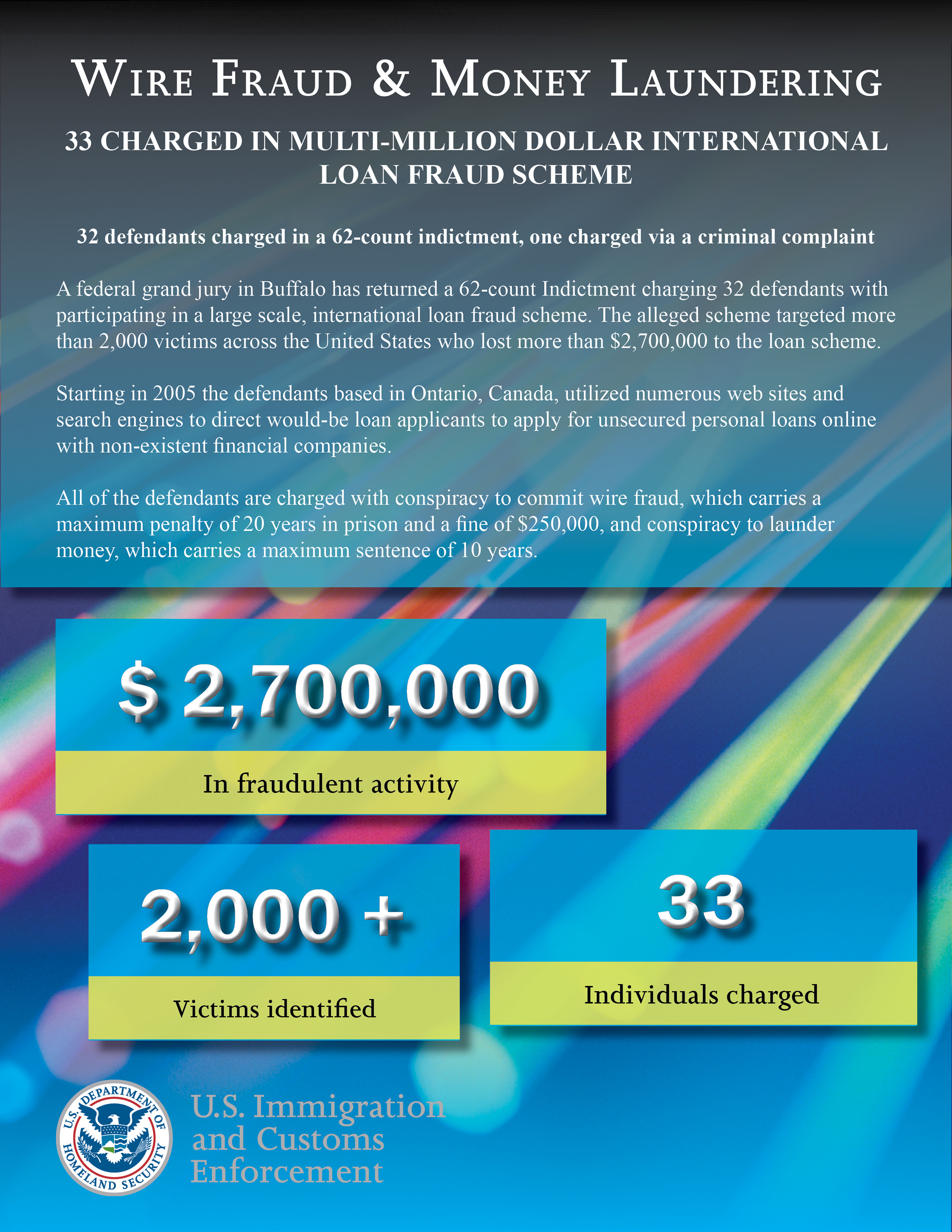
Here is an example of a federal infographic that accompanied news of a Homeland Security financial felony bust in New York where the grand jury came back with indictments:


4/26/13

What are Long Tail Keywords? Why Should You Care About Them?

What is a "long tail keyword" - and why should you care? First of all, it's a phrase used in Search Engine Optimization (SEO) circles, and it's something that is used to try and reach higher in Google Search Results (as well as Yahoo, Bing, etc.).

What is A Long Tail Keyword? 

Long Tail Keyword: 3+ Words
Simply put, a "long tail keyword" is a phrase using 3 to 5 words, could be more, that appears in web content more than once, syncing with the future searcher who may well enter that same phrase in the Google Search Box when researching a particular subject matter.  (You may also hear things about "long tail marketing," etc.)

There are lots of "long tail keywords" in legal writing and in legal blogging (blawging). Right now, for example, the Boston Marathon Bombings are very recent and the phrase "search and seizure" is getting lots of Google traffic (33,400,000 just now).

Other phrases that are getting lots of interest today (according to Google Trends):

  • 2013 NFL Mock Draft (71,000,000 hits) 
  • Katherine Russell Tsarnaev (spouse of the slain Boston Marathon Bomber)(111,000,000 hits)

Why Should You Care?


There will be SEO Experts who throw this phrase at bloggers and lawyers as part of a strategy to get more traffic to the site.  Not to worry: for most legal writing for the web, the "long tail keyword" is a given:  most law firm blog writing includes long tail keywords automatically.

For instance, writers will write about -- and readers will surf for things -- that involve long tail keywords without stopping to consider that SEO is involved.  Long tail keywords often include:
  • case names 
  • legal phrases
  • names of parties
  • names of judges
  • legal jargon 
When writing for the web, many lawyers will automatically include long tail keywords in their piece without knowing they are doing so, especially when their intended readers are other lawyers or legal professionals with the legal savvy to be surfing for similar vocabulary.  Easy peasy.  


3/30/13

Infographics for Lawyers: a Great Addition to Your Law Firm Web Site or Blawg

Infographics (informational graphics) are so much fun, and sure they are getting to be pretty darn trendy right now.  (Just go over to Pinterest and search for "infographics" to find all sorts of wonderfully creative infographics on all sorts of topics.

Thing is:  infographics are great tools for lawyers to use to educate readers about all sorts of issues.  Law firms can place infographics into their websites, their blogs (blawgs), their newsletters, even in client emails.  (I'm not sure about using them in motions or briefs yet - but if I were a judge, I'd welcome the innovation.)  

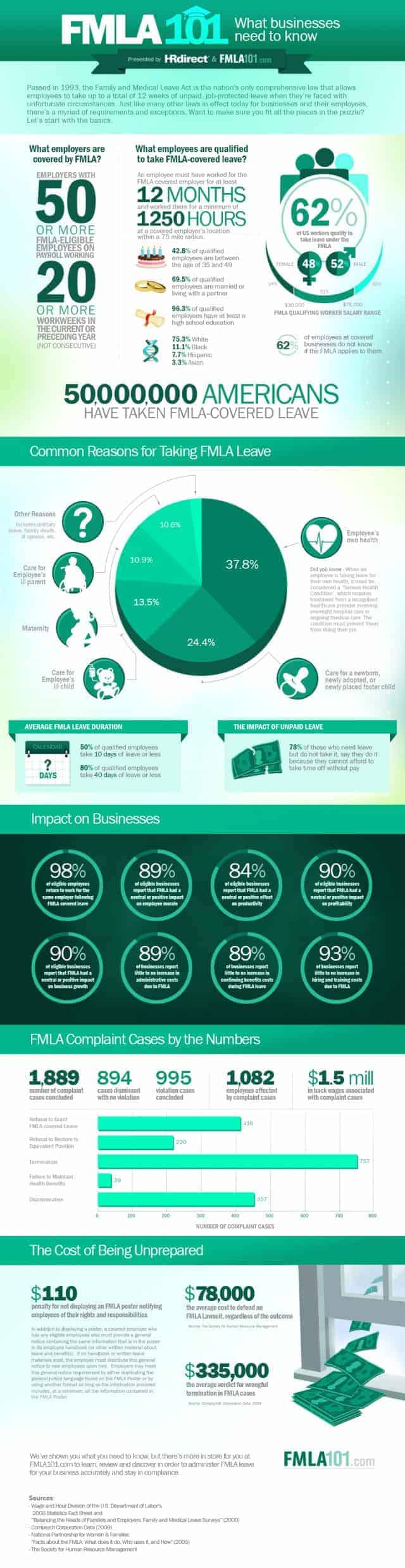
Here, for example, is a great infographic from DailyInfographic that provides details on the impact of the Family and Medical Leave Act (FMLA) upon employers (click on it or hit Ctrl + a couple of times to enlarge the image):


For more information on infographics, check out these online sources:

Daily Infographics 

To learn more about creating original infographics for your site, for free, see:


12/3/12

The Power and Purpose of Citizen Journalists: The Baltimore SWAT Standoff and the Belize Mystery Surrounding John McAfee as Two Examples of Why We Need Citizen Journalists

Citizen journalism may not be respected by traditionally educated and trained journalists, but citizen journalists sure seem to be making lots of headway in reporting news via the web.

I've been watching and reading citizen journalism for awhile now, with growing respect.  Why?  Well, because some people are doing this at the risk of their lives - like citizen journalist Rami Ahmad Al-Sayed who died when he was only 27 years old, leaving behind a wife and young daughter, in order to spread the word over the internet about the military assault he was witnessing first hand in Homs, Syria.

Critics snub the idea of citizen journalists for various reasons:  first, their work does not reach the same level of quality as the professional journalist.  They are amateurs.   Second, citizen journalists cannot be trusted to be objective.  They are biased.  Third, citizen journalists aren't regulated - they have no set of rules or ethical codes imposed upon them as do members of the main stream media.  They are rogues.  

I understand that professionals who have studied in their field for years and thereafter dedicated years of their lives to journalism as a career path aren't too happy with these interlopers.  As an attorney who has seen the practice of law change to allow non-lawyers to practice law in some ways, I get it.

However, when it comes to citizen journalists, I don't care.

I don't trust the main stream media (MSM) much these days -- for one thing, the same finger pointing that is made against citizen journalists has been made much too often against members of the Fourth Estate in recent years for me to blindly trust today's news media.

What?  If you want to delve more into the sad failures of modern, professional journalism then I suggest you check out Joseph Campbell's 2010 book, Getting It Wrong: Ten of the Greatest Misreported Stories in American Journalism - which you can read for free at Google Books (at least you could when I typed this).  Or read the witty column in today's Gawker by Hamilton Nolan, "Mainstream Media Attack Dogs Think We're Asking Too Many Questions About Orange Pie."  It pretty much sums things up.

There's room in my world for both types of journalism, and maybe that's how things should be.  Here are two examples of citizen journalists blogging online that I've been following this week.

The Baltimore SWAT Standoff Blogger

Frank James MacArthur considers himself to be a citizen journalist when he isn't driving a cab up in Baltimore and he writes a blog called "The Baltimore Spectator."  Recently, after MacArthur didn't show in court for a violation of probation hearing on an old weapons charge, the police showed up at his house to issue a warrant.

MacArthur didn't cooperate, and it turned into a five hour standoff.  SWAT was called, but things ended peacefully at 11 pm which MacArthur stated that he intended to coordinate with the evening television news.

Now, sure, MacArthur may have done some of this in order to spotlight his citizen journalist site.  However, MacArthur also had a serious distrust of local law enforcement and chronicled the events as they transpired on the web for what he viewed as his own self-protection.

Belize Murder Investigation and The Mysterious John McAfee

Meanwhile, for a few weeks now the founder of a popular computer security software company, John McAfee, remains at large even though there were reports earlier today that he had been arrested at the Belize-Mexico border.  John McAfee has been blogging his story on the internet as he remains out of the hands of Belize police who are seeking custody of Mr. McAfee as a person of interest in the murder of McAfee's next-door neighbor.  McAfee's blog is "Who is McAfee?"

John McAfee is blogging about his successes in evading capture by the local authorities as well as his concerns that if he is taken by Belize police he will be harmed or killed - and this continuing story is making national news basically because of McAfee's own reporting of events thus far.

Belize police officials are calling McAfee "paranoid."  John McAfee's blog posts, however, don't seem to be the rambling, irrational posts of someone who is mentally ill.  His position is that he believed that if he had peacefully cooperated with police at the get-go, he might be killed.

I believe that blogging is important, but never more so than in situations like this, where individual citizens are sharing their stories - as they happen - with the public at large.  Maybe they aren't the most objective reports; maybe they aren't written as well as they could be; and maybe there's no set of rules or guidelines applicable to their work.

However, in both of these blogging stories by citizen journalists, you have first-hand accounts of what local law enforcement is doing, or not doing, together with the interpretation of those events by the suspect of that police power action. 

I want to read this.  I think lots of people do. I think we need the citizen journalist and I hope that citizen journalism becomes more respected, and protected, over time.    

Citizen journalists blogging on the internet (and I include micro-blogging at Twitter) bring information  to the reader that professional journalists don't provide.  Perhaps they can't provide it, I'll have to ponder that one.

As for the expansion of the police power through technological advances, and how privacy rights are endangered today and Big Brother scenarios are rapidly becoming reality, I'll write about that on my opinion blog soon enough.

5/28/12

Penguin 101: What Google Penguin Means to Bloggers, Really

Here are three articles currently online that provide solid information for bloggers out there who are concerned about Google Penguin and don't want to cull through all the SEO-ese to find out the basic stuff they need to know.

1.  Google Penguin - Wikipedia's article.
2.  "Act Natural. The Penguin is Looking," by Business 2 Community.
3. "3 Hard Lessons to Learn From Penguin: Be Relevant, Be Balanced, Keep it Real" at SearchEngineWatch.

Yes, Google just announced a Penguin update.  There's no need to panic - if you're not doing "black hat" search engine optimization tricks to try and maneuver your stuff to the top of Google's search results.

Penguin in a Nutshell.


Once again:  Google is trying to give its customers the best service it can, and this means putting the most accurate, on-point sites in the top of search results when a Google client surfs Google for information.  After all, if Google doesn't do this well - if Yahoo or Bing do this better, in other words - then Google will lose business.

Penguin and Panda before it and whatever animal comes next -- all are ways that Google is trying to insure the quality of its service in a world where lots of folks spend lots of time and money trying to game the system ("black hats") to get their links into the top of search results.

It's fine to try and write your content in a way that helps your readers find your stuff.  It's not okay to do things like stuffing sites with links just to sway the Googlebot.  

Help Google Help You.


Bloggers should keep their intended reader in mind as they write their blog posts.  They should also keep Google in mind as they write those short blog articles.  Do the best for your readers and for Google, and you'll be fine. 

Image from FreeClipArtNow.com.

3/21/12

Cutting and Pasting into Blog Posts: Don't Be Lazy

I have a client that is great about keeping up with her weekly blogging schedule.  She posts twice a week, period.  You can depend on it. 

And that's great.  

What isn't so great, though perfectly understandable, is taking a section of writing from another source (another post, a magazine article, a book) and then cutting and pasting the guts of that writing into a blog post with a brief introduction, "I really liked this [insert name of source material] because it's so on point! It's so true!"

Or something like that.  Why is this bad?  

Well, as my client points out this might (or might not) be within the fair use doctrine and therefore not any kind of copyright infringement and it's clearly not plagiarism because she's giving credit where credit is due (she's not trying to claim the stuff as her own). 

However, substitute the cut and paste for a hyperlink and the post becomes a sentence or two.  Insufficient original word count.

True, it's great to find something that you want to share from a book (or magazine article or blog post) that someone else has written and use it as the basis for a blog post.  There's also the time-saving benefit (as my client pointed out, these types of posts are helpful on days where posts are scheduled and there's a time crunch). 

But what are you really sharing of yourself here?  And, without going into geek-talk (my client hates going down this road), Google will not appreciate these kinds of blog posts.  At all.  

Here's what I think needs to happen.  

I think that when you share something, you need to give your reader more than "lookie."  I think you need to comment and give your opinion on why you are sharing this writing with them.  

If you don't have time for that, then go for a link list ... something like a Top Ten list, ten great sources of inspiration when you're dieting; ten great recipe sites; ten great med mal blogs, whatever.  That's pretty fast blogging and it's giving your reader more of you than one of these "lookie" posts does. 

2/27/12

Yahoo! Alerts: Another Good Source for Blog Post Topics

I've been using Yahoo! Alerts for a couple of months now, and I'm very happy with the service. 

Last November, I wrote about Google Alerts, Social Mention, etc. and they are also nice.  However, I am particularly happy with how Yahoo!Alerts is popping up with information for me.

Now, admittedly I am only using one aspect of Yahoo! Alerts: their News Alerts, where I choose keywords and then receive summaries in email of top news stories that correspond to those keywords.  For example, I have Yahoo! Alerts set up for "copyright infringement" and "blogging."

However, the service offers a lot of options, and you may find other things more to your liking.  Check it out. 

Interestingly, once I have notice of the news story or blog post via Yahoo! Alerts, I still tend to pop over into Google to investigate what's up and find more information for what I'm writing.

2/23/12

Citizen Journalists: Syrian Rami Al-Sayed Died in This Week While On the Job

Bloggers who publish news for their readers don't get the label of journalist these days - the best they can hope for is the label "citizen journalist," even when they die while covering a story with the depth, breath, and importance of anything covered by a traditional media source.

Lawyers Understand the Professional Frustration Felt by Traditional Journalists

As a lawyer, I understand the professional frustration: it's a complex reaction to technological advances that seem to make years of advanced education and professional experience unimportant and unnecessary. Lawyers compete with RocketLawyer, LegalZoom, and local streamlined legal processes in many jurisdictions.

That's a lot to bear even before considering outsourcing to India. Where's the unauthorized practice of law hatchet? What about the need to consider an individual's circumstances, the personal expertise that the attorney brings to the table?

No matter. Times are changing and lawyers are having to deal with those changes.

Journalists are going to have to do this, too. Which brings me to this citizen journalist thing. 

Today's news brings with it the sad report that a blogger operating out of Syria named Rami Ahmad Al-Sayed, who posted videos and messages online to share with the world what was is happening right now in Syria, has died. (Check out his YouTube offerings here.)

Blogger Rami Ahmad Al-Sayed was 27 years old, and leaves behind a wife and tiny daughter. This young man risked his life in order to report (and yes, that is what he was doing) on the military assault that is happening right now in Homs, Syria.

He brought news to the world in the same way that those crusty, courageous journalists do that we recognize with pride here in America: those that risk their lives to get the story out as "war correspondents." 

 The story is this: Syria is killing thousands of people right now and Syria is blocking all outside communications as best it can. No internet, no cell phones, you get the idea.

Al-Sayed was brave and bold and because of him, we know some of what is going on in Syria today. That's reporting. That's journalism.

Still, read the news of his passing today and the best you'll see is coverage of his death and the label "citizen journalist" or "video blogger" ... and in one main stream media story, he gets the bottom couple of paragraphs in a story covering the death of a traditional journalist who also died this week.

God bless Rami Ahmad Al-Sayed for his work, condolences to his family. A journalist died this week trying to share truth - and that's the bottom line, folks.

2/22/12

Books on Your Blog or WebSite: PDF or eBook? Why You Should Choose PDFs.


There's lots of chatter right now about adding books (eBooks, booklets) to blogs - particularly law firm blogs.  Usually, this talk is accompanied with a discussion of coordinating those publications with an offer for the book at no charge in exchange for the reader signing up to a service like Aweber.

More and more law firms are doing this.  A nice book cover image appears in the sidebar; it's a free offer for in-depth information on an important topic like tips on avoiding foreclosure; tips on making end of life decisions; ways to limit risk in alternative investments, etc.  Click on the image and the reader usually has to provide an email address in order to get the freebie, and afterwards that email address may receive a series of follow-ups: more free information, etc.

Choosing to Build a Book for Your Blog or Web Site  

Along with the chatter about books on blogs comes lots of confusion and I've had several calls from clients and colleagues that are overwhelmed about the process (or options) once they start investigating this stuff.  Once they understand their state's bar regulations on the issue, and they've got a game plan on what they want to accomplish, then comes the practical decisions to be made.  How to get this done - it's not as easy as it may first appear. 

Offering a free book on your blog is not a bad idea -- it's a good idea -- but you need to know at the get-go that it isn't all that easy to get from start to finish.

Right now, self-publishing eBooks are trendy.  These are coded documents that can be read on specific devices (e-Readers) like Kindles, Nooks, Sony eReaders, as well as IPads, Kindle Fires, etc.

This is usually the first kind of document that the lawyer envisions.  Maybe the only one, because many aren't considering PDF formatted documents as something that can create snazzy books for their sidebar.   All this talk about self-publishing means many lawyers don't understand the different options open to them. 


PDF Books for Your Sidebar

For lots of lawyers and law firms, the formatted eBook alternative of using a .pdf document, formatted both for security and for a professional appearance, is the preferred option.  Surf around and you will find that PDF documents are appearing quite often in blog and site sidebars as the chosen format for that free book offering.


Why a PDF?  

1.  PDF books are easy to create: you can create your book using Microsoft Word or Open Office.  No need to learn fancy coding like you need for a self-published eBook for Kindles or IPads.  

2.  PDF books can be full-color with sophisticated graphic design.  This format allows a glossy, magazine-like product that self-published eBooks cannot provide now with their coding limitations.  Kindles and other eReaders don't like images very much, and they are hard to insert into the reader-approved format. 

3.  The PDF option gives you lots of number-play.  With a PDF book, you can include all sorts of graphs or tables or pie chart images that the Amazon/Smashwords/etc. coded eBook cannot include now.  Footnotes, no problem.  E books coded for Kindle or the IPad or the Nook are best left to words alone, black on white text, with hyperlinks.  No footnotes, please.  Check out various magazines, blogs, and other graphically-oriented publications on the nearest Kindle or Sony E-Reader and see what you find.  

4.  Most readers are familiar with the PDF format; additionally, these documents can be read on almost every device.  You can even upload a PDF document onto a Kindle, for example.  However, you cannot read a Kindle eBook on any device other than a Kindle eReader or a computer that has downloaded the free Kindle software onto its hard drive.  

  
What I Suggest You Consider Doing For Your First Publication

For law firm clients ready to place books on their blogs or web sites, I proposed that they review their blogs or newsletters to find a series of posts or a single theme that can serve as the springboard for a .pdf document.   

Next, prepare a Word (or Open Office) document with text that flows, pulling together those blog posts or newsletter articles into a cohesive document that will serve the reader well as a PDF book.  Make sure to include a table of contents and an "about the author" section.  

Work with a graphic designer if you choose to do so, or just use a Word template.  Get your Word document looking like a professional product, then convert it to a PDF document.  

Make sure that you have your security features in place (no cutting and pasting, limited sharing or printing, etc.) and you're done.  

Now you have a very nice offering, in a format that most recognize and can read on whatever screen they choose to use, that can be:

             a.  placed on the blog;
             b.  sent by email to whomever you choose; and
             c.  used in an email marketing campaign;
             

2/10/12

Cut and Pasting From the Web: Be Careful.

Last week, another client was happily posting away on their blog and proud of their word count.  Which was good.  However, most of that word count involved cutting and pasting from other web sites.  Not so good.

First of all, it's fine to share news releases.  They are written to be distributed -- the intent of that release is to get that message out.  So, sharing these cuts and paste excerpts in a blog post with an intro "news from Acme site this week" is not a bad, horrible (and by that I mean illegal) thing to do.

Second, it's fine to share information provided on government sites, for example in their "frequently asked questions" section.  Intro the cut and paste excerpt with something like "the [name of agency] recommends the following" and you're fine. 

Third, it's okay to share your own stuff.  Excerpts from your firm website in a firm blog post isn't violating anything.  Example:  the post is discussing a major product recall and you provide an excerpt from the site that discusses your state's products liability law. 

Here's where it's not okay.  It is not okay to take content from other sites - especially news sites - and cut and paste them into your blog post, wham bam.  My client, excited about coverage in the media, plugged media coverage into the blog without getting any okay from the media source.

Not to mention not checking with the news source to determine how much they wanted in payment for the use of their news story.  And its photos. 

Luckily, that post was not published online before someone checked with me and I pointed out that this was copyright infringement of the copyright held by the media source. 

Newspapers and television news departments publish news with photos and videos online because that is how they generate revenue.  They will share that content and those images with you, but they may want payment for the use.  Maybe it's a lot.  Maybe it's a little.

Point is: news stories and television videos - even if you are prominently a part of the story - should not be duplicated on your web site or blog without the permission of the copyright owner. 

Sure, you may think I am nit-picking.  After all, aren't you helping that news source by publicizing its work?  Sorry, but I don't know that the owner of the copyright will agree with that argument.  And, after all, isn't the story all about you and your victorious win, so don't you have some sort of indirect ownership right in the news article anyway?  No.  No you don't.     

Go ahead if you want to risk it.  Lots of sites do this, true.  However, now that NewsRight is out of the box, my nit-picking today may seem prophetical tomorrow.

Better safe than sorry, folks.  Plus, it's the right thing to do.  Don't just plug those news articles into a blog post, even if you or your firm is the star of the story. 

2/6/12

NewsRight: Has Main Stream Media Found a Bigger and Better Righthaven Model? Many Think So. Bloggers, Beware.


This past month, concern has grown over NewsRight, which has many of Main Stream Media's biggest companies (Associated Press is its shareholder, others include the New York Times), working together in their fight to stop various web sites (bloggers, news aggregators) from profiting off their words.

You'll remember my post from long ago, where AP was wanting to be paid per word for its content.  If you quoted - or cut and pasted - over five words from one of its stories, AP expected to be paid. Five words, fork over $12.50.  

That didn't work, apparently.  And now, these MSM folk have banded together to form NewsRight.  You can read what they want you to know about this new venture on their website.

Meanwhile, consider what others are thinking. 

MediaPost hat tips to Righthaven as it discusses NewsRight as an attempt to stop "scrapping" of news stories by web sites. Techdirt considers NewsRight to be "Righthaven Lite," since they don't appear to be as sue-happy as Righthaven was (Righthaven would sue without any advance cease and desist notice).   At least one media law professor seems to agree - we won't see lots of lawsuits being filed (yet). 
 
And, for an different perspective, consider Nieman Labs optimistic take on things:  NewsRight is a good thing.  Really.  


1/28/12

COPPA Applies to Blogs: the Xanga Story


More and more, it appears that blogging will gain the respect that it deserves not from appreciation of its content, its growth as a solid, accepted social media outlet, nor its ability to share breaking news, but because bloggers have become parties to litigation in various forms.

Alongside copyright infringement and shield law cases popping up all over the country, consider this:  the Children's Online Privacy Protection Act (COPPA) was passed by Congress to protect kids from online skulduggery.

In sum, COPPA regulates how personal information is gathered and used when it's kids who are inputting the stuff.  It requires things like parental consent for purchasing info, for example.

Last spring, Disney got hit big time with a fine by the Federal Trade Commission to the tune of $3,000,000.00 for collecting info from kids at its Playdom, Inc. site without parents' okay

However, here's the point I'm making.  Bloggers must adhere to the COPPA regulations just like Disney Corporation and other Big Kahunas. 

Xanga.com, for example, is a blogging service that was sued for COPPA violations awhile back.  Xanga offered MySpace-like services to kids and got hit with a $1 million fine (the biggest COPPA fine at that time, according to MSNBC). 

Seems Xanga was allowing kids under 13 years of age set up blogs in its "blogging community" and the Federal Trade Commission found this did not comport with COPPA requirements.

True, Xanga isn't a blog itself -- it's a blogging service.  However, it's still within that blogging realm and its story is a part of the path to blogging's respectability. 

1/24/12

Illinois Shield Law: Chicago Case Rules No Protection for Blogger

Another blog fight over application of state shield law.  Expect this Illinois case of first impression to go up on appeal, after all the losing party has already announced that the fight’s not over.
 
Nevertheless, a Chicago court has set a precedent on how Illinois will apply its shield law in the case of a blog out of California, TechnoBuffalo, which has been sued by an Illinois printing company, Johns-Byrne Co., in a lawsuit asking the court to force the blogger to reveal its source for an image of a Motorola cellphone (the Droid Bionic)

John-Byrne argued that it needs the name of the blog’s source in order to seek legal remedies against what it believes to be an evildoing employee who violated John-Byrne’s legal rights by sharing the images. 

TechnoBuffalo responded by arguing the state shield law, and claiming that it was acting in the same role as a traditional media source reporting on the cellphone industry. 

What is the big deal?  TechnoBuffalo published the pix on its blog before the cellphone was actually available for sale.

Some would call that a “scoop.”

Nevertheless, the Cook County Circuit Court Judge ruled that the blog is not the same as Main Stream Media and shield laws of Illinois (and presumably California? though how the Chicago judge could rule on Cali law escapes me) and ordered the name of the blog’s confidential source to be released.

Let’s see if the appellate court agrees.